Dragones CRM
The only CRM built exclusively for metal service centers.
We built it inside a working metal service center. It tracks what you track: revenue, profit and shipped weight on every account, and the grade, size and margin on every order line.

- 2017
- In continuousdevelopment since.
- Days
- To go live for most customers,not months.
- Every line
- Grade, size, weight and margin,on every line of the order.
- ~10 min
- How often it syncswith your ERP.
What we kept hearing
The quote log, the pounds, and the quiet accounts.
The quote log is a spreadsheet.
Quotes get tracked in a workbook that lives on one person's machine, or in nobody's. The sales meeting runs on a version of that, retyped, a week late, and nobody in the room is certain it is current.
Pounds are harder to find than dollars.
Last year's sales dollars are usually to hand. How many pounds the account actually bought, or which line of a multi-size order carried the margin, waits on a report at month end.
Accounts go quiet and nobody notices.
An account asks for fewer quotes, then places fewer orders, and nothing in the system raises its hand, because nothing has been told to watch for it. It turns up in the quarterly review, by which time the call you make is to ask what went wrong rather than to stop it.
How it works
It starts with the account list.
01
You do not start with an empty screen.
Once the integration is connected, your companies and individuals and your quotes and orders are already in here. Nobody has to key them in. And you are not limited to customers in here. You can track mills, processors, carriers, competitors and prospects, relationships that are not in the ERP at all and in a lot of cases never will be. Your ERP knows who you have invoiced. This also knows who you are trying to sell to.
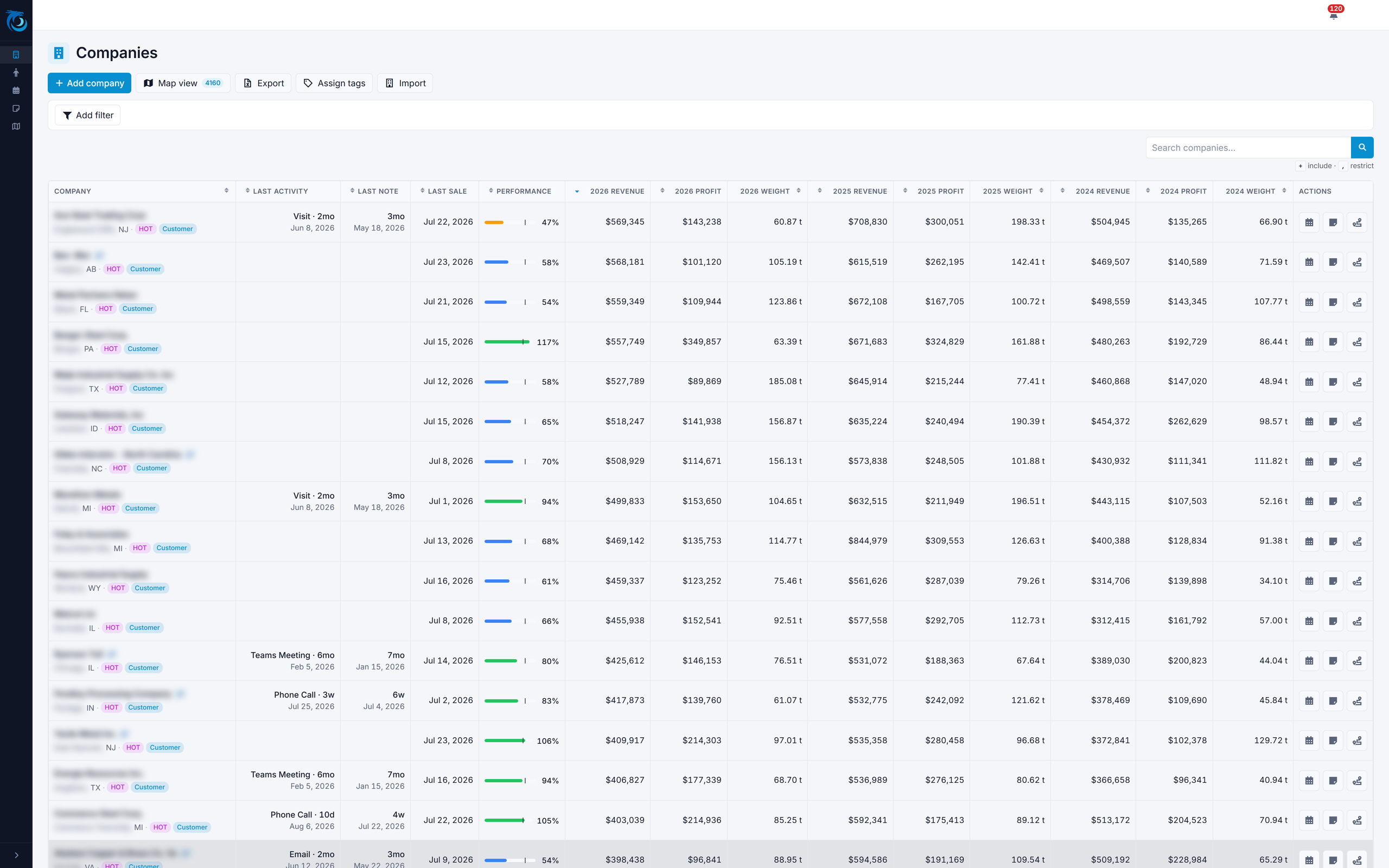
Every account, with 2026 revenue, profit and shipped weight in the grid. 02
You can open the order down to the line.
Open a company and the revenue, profit and shipped weight are already on the screen, three years of them, without running a report and without opening the ERP. Open an order or a quote and you get the lines: the grade, the size, the quantity, the price, the weight and the margin on each one. An outside salesperson can sit in the customer's parking lot and read exactly what that customer bought, at what size, at what margin, without an ERP login and without calling the office to have somebody look it up.
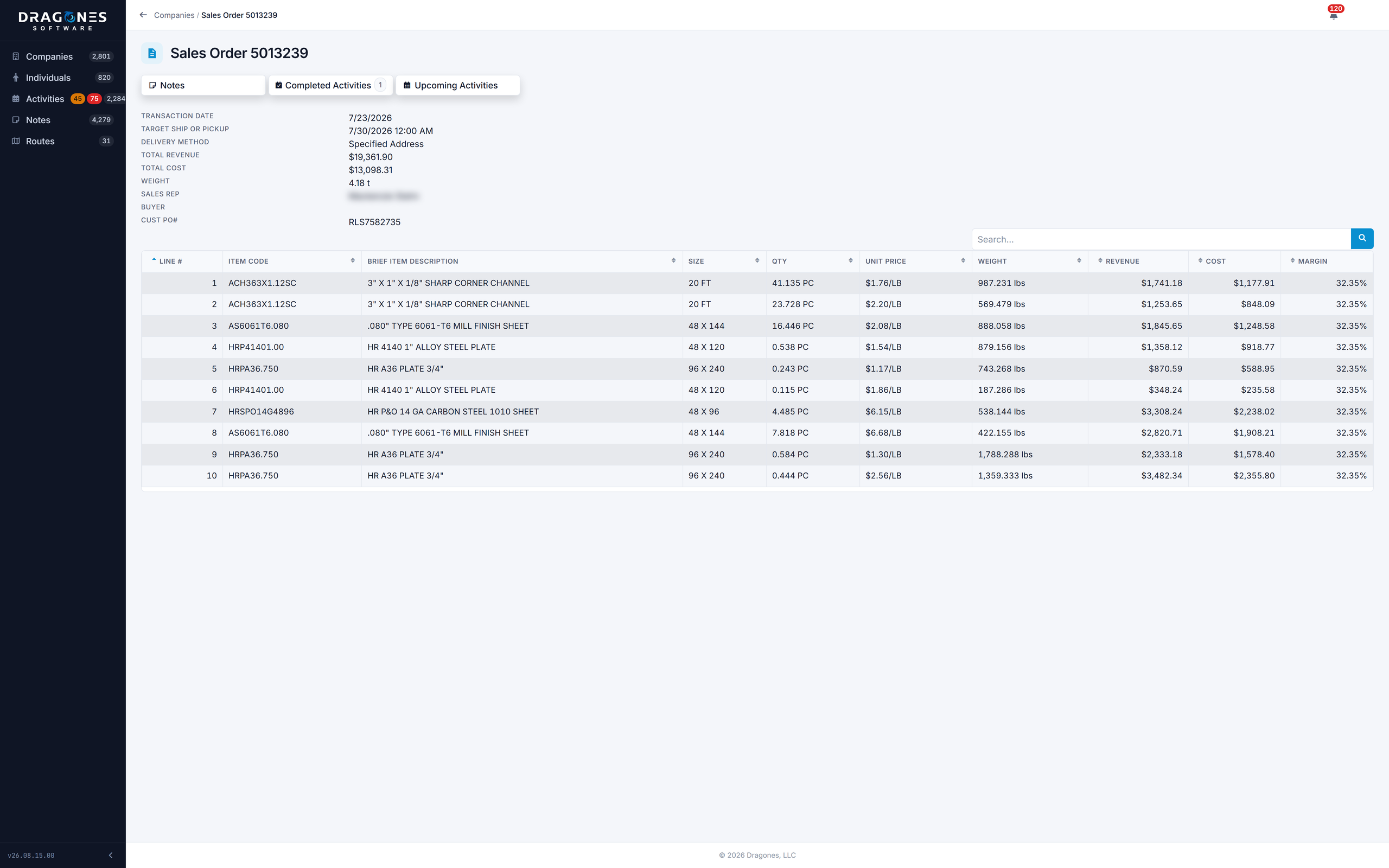
03
Activity Rules create the follow-up.
Instead of relying on somebody remembering to follow up, you describe the situation once and the system watches for it. Trigger on a quote over a certain amount, on an order over a certain amount, on a schedule, or on a period of inactivity. A rule can cover the whole book or a single customer. Any account nobody has touched in sixty days gets a follow-up created for whoever owns it, and you set the threshold, because sixty days is about right on some books and far too long on others. What the rule creates is an upcoming activity, sitting on somebody's list with a date on it.
Now that I’ve been using the “add upcoming activity” feature on the CRM for the last month, I have to say it’s awesome. It doesn’t allow anything to slip between the cracks and keeps all current activity in front of me, so I know when to follow up and when to call. Everyone should be using this!
Steve K.Benner Metals Corporation


What it does
Five things built for how a service center sells.
Last activity, last note, last sale or shipment.
They sit beside the numbers in the account list, so an account nobody has touched for a while is visible without going looking for it. And because shipped weight sits next to the money, you can pick out the one spending about what it always spent on noticeably less metal.
From four thousand accounts down to twelve.
Tags are yours to define: territories, product groups, certifications, mill sources, whatever you segment the business by. Filter on the tags you want in, the tags you want out, and whether an account has to match all of them or any of them. That is how you get from four thousand accounts to the twelve worth a call this week.
Every call and visit stays on the account.
You name the activity types, so a face-to-face visit is logged as a visit and a quote chase as a quote chase. It is logged against the account, so the next rep to take the territory can read what was said and when.
Routes and territory maps.
Build the day's route on Google Maps, or add a stop to it from the road. Draw a radius around any address, or around where you are standing, and the map shows every account inside it. Optimize the stop order, then email the route out with a link on every stop straight to Apple Maps, Google Maps or Waze, so whoever is driving is not retyping addresses. The territory map holds whatever filters the grid is holding, so "everyone within ten miles who has not ordered this quarter" is a map, not a spreadsheet. It installs as an app on the phone in the truck and it has a dark theme.
Reports and forecasts, exported to Excel.
Custom reports and sales forecasts export to Excel, and companies and individuals move in and out of Excel too. Permissions decide who sees which of it, down to the row and the field: a rep can see weight and revenue on the accounts assigned to them while profit stays with management.

Proof
What operators say, and where this came from.
We’ve been using Dragones CRM and immediately began seeing the benefits. The synchronization with our ERP has allowed for rapid knowledge transfer between our outside and inside sales force. In the short time we’ve been working with this, it has become a vital tool for our sales team. The development has been swift with more features added with every new release.
In production
We built it in a service center.
Dragones CRM is built for metal service centers in the US and Canada, and runs in production at service centers today, each on its own dedicated environment. We wrote it inside a working service center because we wanted it and could not buy it, and it talks about grades and sizes and shipped weight because that is what the salespeople down the hall were asking us for.
Platform
What it runs on, and what it connects to.
| Weight | Line weights are kept to three decimals, so material under a pound does not round away to zero, and the whole system reads in tons above 2,000 lbs when that is how the shop talks. |
|---|---|
| Integrations | Direct connectors to the major metal service center ERPs, syncing companies, individuals, quotes and orders. Also runs standalone. |
| Tenancy | One dedicated environment per customer, with its own isolated database. Not multi-tenant: there is no tenant column in the schema at all. |
| Apps | Installable progressive web app on desktop, tablet and phone. Light and dark themes. One licence covers every device a user signs in on. |
| Platform | ASP.NET Core on .NET 10, the current long-term support release, with Microsoft SQL Server 2019 or newer. |
| Hosting | We host it in Microsoft Azure, or you host it on your own infrastructure. Because an environment is self-contained, it moves between the two. |
| Access control | Page- and action-level permissions for inside sales, outside sales, call center and management, and down to the row and the field: weight, revenue and profit are separate grants. A departed user is locked out instantly. Traffic and database connections are encrypted, with account lockout and login rate limiting, and independent 24/7 uptime monitoring runs health checks on every deployment. |
| Implementation | Three phases: your instance and initial data import, then the integration, then training and go-live. |
Objections
The questions that come up first.
How long does implementation take?
Most customers go live in days, not months. Three phases: we build your instance and import your initial data, we connect the integration if you are connecting one, then we train your team and go live. The training part is a few sessions with your key people, where we get the permissions right, set your activity types up the way you already talk about the business, and work through how each team is actually going to use it. Support is included at every term.
What happens to the data we already have?
It comes with you. If you are coming off another CRM, we have migrated data from a lot of different platforms over the years, so that history comes too. Companies and individuals move in and out of Excel any time after that, so nothing you load is trapped.
What does this do to our ERP?
It reads it, and changes nothing in it. Data moves one way, into the CRM, so your order entry, your pricing and the screens your office already works in stay exactly as they are.
Who owns the data, and where does it live?
You do, and it lives in a database that holds nothing but yours. Every environment is single tenant: one customer, one deployment, one database. The schema has no tenant column in it anywhere, which is the part worth asking us about, because it means there is no shared table your rows could be sitting in with a filter standing between them and somebody else's. An environment is also self-contained, so it runs where you need it: in our Azure subscription, or on your own infrastructure, and it can move from one to the other later. Reports, forecasts, companies and individuals export to Excel whenever you want them, without asking us.
Why not just use Salesforce or Microsoft?
We asked that first, and we priced it. Wiring a general-purpose CRM into what a service center already runs means a custom integration, priced and maintained by someone forever. Out of the box it does not track shipped weight, it does not show you the lines on a quote, and a mill or a processor is just another company to it. So we built it ourselves, inside a service center.
What if it does not work out?
We are month to month. Commit annually or for two years and the pricing gets better, but nothing requires it. The reason we are month to month is that we only want customers who want to be here. If we are not earning it, you should not be locked in.
See an account, from order detail to next follow-up.
We will open a real account and go through it line by line, the way your reps would on a Monday. Bring one of your own if you want to. You do not need to send us anything first.
- Month-to-month by default.
- Better pricing on annual or multi-year.
- Support and guided onboarding included.
- Data-migration assistance.